WhatsApp marketing for small business provides a direct line to your audience on a platform they already trust. In fact, according to The 2026 Social Media Content Strategy Report, 46% of marketers are increasing their investment in WhatsApp this year to capture high-intent users. While many small teams view the app as just a customer service inbox, the most successful brands use it to drive the entire customer journey—from initial product discovery to the final sale.
This guide covers everything you need to transform WhatsApp into a high-impact marketing channel: from setting up your Business profile to launching campaigns that drive repeat purchases and measurable ROI.
What is WhatsApp marketing for small business?
WhatsApp marketing involves using the WhatsApp Business app or Platform to promote products, support customers and facilitate sales through direct messaging.
As a text-first powerhouse, WhatsApp is the second most popular network for text-driven social media (26%), making it the ideal environment for the conversational marketing formats that actually move the needle. By leveraging one-on-one chats, broadcast lists and automated responses, you can provide a white-glove experience that feels personal even as you scale.
The platform offers two distinct solutions:
- The WhatsApp Business app: A free tool that supports one primary phone and up to four linked devices—a perfect starting point for small teams.
- The WhatsApp Business Platform (API): Designed for growing operations that require advanced automation, CRM integrations and multi-user access.
Why is WhatsApp marketing beneficial for small businesses?
WhatsApp transforms standard business communication into a high-trust, conversion-ready channel by meeting customers in their most personal digital space. For small teams, the platform’s primary advantage lies in its ability to bypass noisy social feeds and crowded email inboxes, delivering your message directly to a mobile device with nearly guaranteed visibility.
Reach and open rates
WhatsApp ranks as the fourth most used platform globally, but in specific markets, it is the undisputed leader. According to the Q2 2025 Consumer Pulse Survey Analysis, it dominates as the #1 social platform in the UK with an 81% usage rate. Furthermore, The 2026 Social Media Content Strategy Report reveals that 52% of all social media users already have WhatsApp accounts, providing a massive, low-friction opportunity for small businesses to meet customers where they already live.
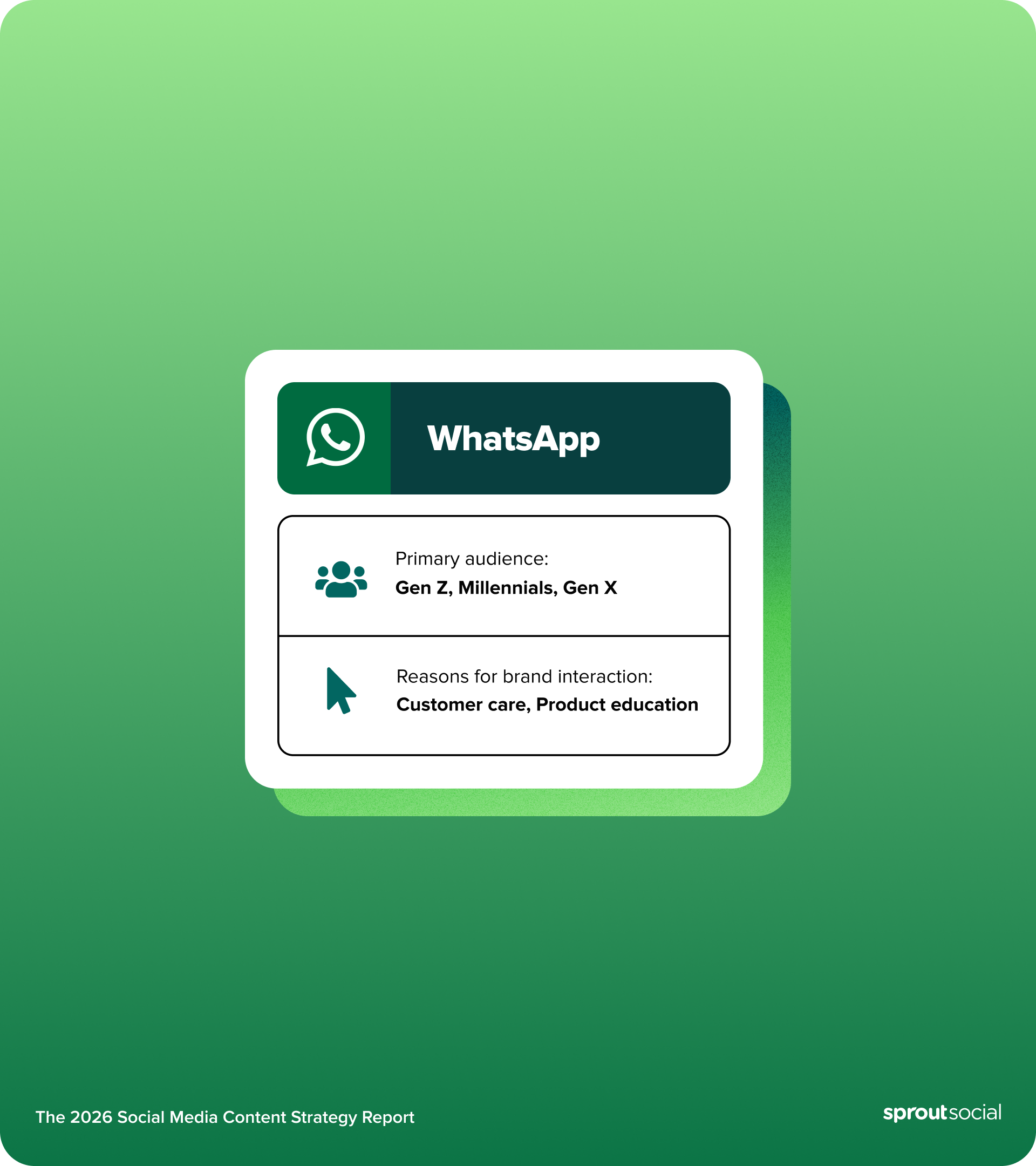
Market Usage Rate Weekly Interaction Key Insight United Kingdom 81% 60% Ranked #1 social platform in the UK. United States 52% 85% Highest weekly brand interaction frequency. Australia N/A 36% Emerging market for brand engagement. Global 2B+ Users 49% 4th most used social platform worldwide.To capitalize on this, brands must know who they are talking to and whether their target audience is on the WhatsApp platform. According to The 2026 Social Media Content Strategy Report, WhatsApp’s primary audience consists of Gen Z, Millennials and Gen X, showing the platform’s broad appeal across the most active consumer demographics.

Not to mention, WhatsApp messages consistently see significantly higher open rates than email, with many messages read shortly after delivery. No other channel puts your message in front of customers this fast.
WhatsApp is used by billions of people across more than 180 countries, making it one of the most widely adopted messaging platforms worldwide. In markets like India, Brazil and Indonesia, WhatsApp is the primary communication channel for both personal and business interactions.
High frequency engagement
Engagement on WhatsApp isn’t just high; it’s “sticky.” Data from The 2026 Social Media Content Strategy Report shows that 49% of users interact with brands on the network multiple times per week. In the UK, this connection is even more frequent, with 31% of consumers contacting brands on the app multiple times per day.
Customer convenience
Customers aren’t just open to hearing from you on WhatsApp—they expect it. The 2026 Social Media Content Strategy Report highlights that 40% of users specifically want companies to show up on the platform to provide customer service and support.
This utility spans the entire journey: consumers are most likely to use WhatsApp when they have a question about an order, followed by when they want to learn about a company’s product or service.
Customers already use WhatsApp daily. They don’t need to download a new app, create an account or remember a password—they message your brand the same way they message a friend.
WhatsApp’s multimedia capabilities let customers share product photos, send voice messages and receive PDF invoices or catalogs. This flexibility accommodates different communication preferences.
Personalization at scale
WhatsApp enables personalized conversations even as your customer base grows. Customer labels help you segment audiences, message templates keep responses consistent and quick replies preserve the personal touch customers expect.
When your team manages high message volumes across campaigns, Sprout Social’s Smart Inbox unifies WhatsApp conversations with messages from other social media platforms—giving everyone complete customer context in one place.
Cost efficiency
The WhatsApp Business app is free. The WhatsApp Business Platform (API) uses a usage-based pricing model, where costs vary depending on the number and type of messages sent.
One agent handles multiple conversations simultaneously. Automated responses answer common questions instantly, freeing your team for complex inquiries and improving the overall social media customer experience.
What WhatsApp business features are there for small businesses?
Small businesses leverage WhatsApp to bridge the gap between product discovery and personalized care. Key features like automated greeting messages, quick replies and catalogs transform a standard messaging app into a robust storefront that drives meaningful engagement.
Quick replies
Quick replies are pre-saved responses you trigger with a forward slash (/) and a keyword. Type /hours and your full business hours message appears instantly.
Small teams save hours weekly by standardizing responses without losing the conversational feel. Create quick replies for:
- Business hours: Include timezone and holiday schedules
- Location: Add a Google Maps link and parking information
- Payment methods: List accepted options and any fees
- Return policy: Outline your timeframe and conditions
Away messages
Away messages automatically tell customers when you’re unavailable and when they’ll hear back. Customize different messages for after-hours, weekends and holidays.
Include an alternative contact for urgent issues. This transparency prevents frustration and keeps your brand professional around the clock.
Labels and tags
Labels organize conversations by status (new, pending, resolved), customer type (VIP, wholesale, retail) or inquiry category (support, sales, feedback). Color-coded labels make inbox management visual and fast.
Apply multiple labels to track conversation progress. Label all “shipping delay” messages, for example, and you’ll quickly spot recurring operational issues.
Catalog and collections
WhatsApp’s built-in catalog lets you showcase a wide range of products with images, descriptions, prices and links. Organize items into collections like “New Arrivals” or “Best Sellers.”
Customers browse your catalog without leaving WhatsApp. Share individual products or full collections mid-conversation to make recommendations feel natural and timely.
Broadcast lists
Broadcast lists send one message to multiple contacts while appearing as individual chats to each recipient. Unlike group messages, no one sees who else received it.
Use broadcast lists for:
- Product launches: Notify interested customers first
- Flash sales: Create urgency with time-limited offers
- Updates: Share business news or new services
Only send broadcasts to customers who’ve opted in and saved your number. WhatsApp limits delivery to opted-in contacts to protect both businesses and users.
WhatsApp ads
Directly connecting your social media advertising to your inbox is one of the most effective ways to drive high-intent leads. WhatsApp ads appear on Facebook and Instagram with a “Message on WhatsApp” button. These click-to-WhatsApp ads move customers from social media discovery directly into a private conversation with your brand.
Target by demographics, interests and behaviors. Pre-fill opening messages to guide the conversation and qualify leads from the first reply.
WhatsApp Business vs API for small business growth
Deciding which version of WhatsApp marketing software to use depends on your team size and growth goals. The WhatsApp Business app is free, requires no technical setup and works for teams under five people. It’s the right starting point for local businesses, freelancers and startups.
The WhatsApp Business Platform (API) scales with you. It unlocks multi-user access, chatbot automation and CRM integration. Upgrade when you hit any of these points:
- You need more than five team members in WhatsApp
- You want to connect WhatsApp to your CRM or other business tools
- You need detailed analytics and reporting
- You’re managing high message volumes that require instant automated responses
The transition from app to API doesn’t require starting over. Your existing WhatsApp Business number and conversation history migrate with you.
What small teams need before launching WhatsApp marketing
Before sending your first broadcast, you must establish a foundation that balances professional branding with strict compliance. Small teams should focus on building a high-trust environment by securing explicit permissions and organizing assets that ensure every customer interaction feels seamless and intentional.
Business profile and brand assets
Complete every field in your WhatsApp Business profile. Include your business description, category, email, website and address. Upload a professional profile photo that reads clearly at small sizes.
Your business description has a limited character count, so focus on clearly explaining what you offer and what sets you apart. Use it to explain what you offer and what makes you different—it’s often the first thing customers read.
Prepare these assets before launch:
- Profile photo: 640×640 pixels minimum, centered logo
- Catalog images: 500×500 pixels minimum, consistent backgrounds
- Document templates: PDF menus, price lists or catalogs
Opt-in collection flow
WhatsApp requires explicit customer consent before you send promotional messages. Build opt-in touch points across every customer interaction:
- Website forms: Add a WhatsApp opt-in checkbox to contact forms
- QR codes: Display in-store for instant connection
- Social media: Share your WhatsApp link in bio and posts
- Email signatures: Include a click-to-chat link
- Receipts: Print QR codes on purchase receipts
Document each opt-in with the date, method and what the customer agreed to receive. This protects your business and keeps you compliant with WhatsApp policies.
Audience segmentation plan
Segmenting your contacts ensures your messages feel like a service rather than an interruption. Build segments based on where customers are in their journey:
- New customers: Welcome series and onboarding
- Regular customers: Loyalty rewards and exclusive offers
- Inactive customers: Win-back campaigns and feedback requests
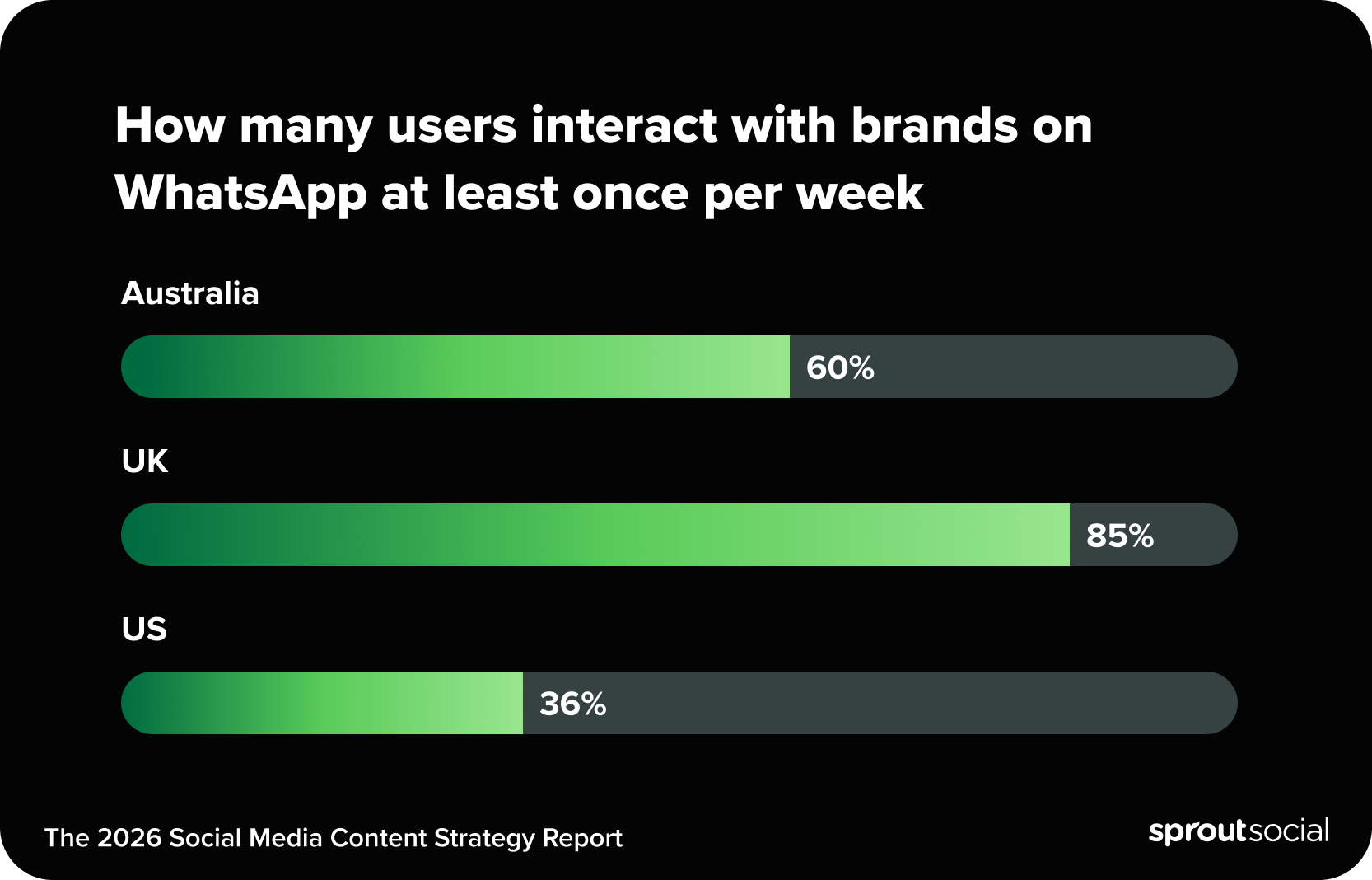
Beyond purchase history, regional behavior must dictate your strategy. Data from The 2026 Social Media Content Strategy Report shows that the frequency of brand interaction varies significantly by region. Specifically, 85% of users in the UK interact with brands on WhatsApp at least once per week. This is followed by 60% of users in Australia and 36% of users in the US. Use these benchmarks from the report to set your broadcast frequency and ensure you are meeting the unique engagement expectations of each market.
Clear campaign goals and KPIs
Define what success looks like by selecting specific metrics before you launch.
Sales goals:
- Conversion rate from WhatsApp conversations
- Average order value from WhatsApp customers
- Revenue attributed to WhatsApp campaigns
Service goals:
- Response time to customer inquiries
- Resolution rate for support tickets
- Customer satisfaction scores
Engagement goals:
- Message read rates
- Reply rates to broadcasts
- Catalog view-to-inquiry ratio
Establish baseline metrics first, then track weekly.
Step-by-step WhatsApp marketing plan for small business
Moving from reactive messaging to a strategic marketing engine requires a documented approach to how you engage different customer groups. This plan helps you automate repetitive touch-points while maintaining the personal touch that makes WhatsApp a high-conversion channel for small businesses.
Segment your audience
Pull customer data from your point-of-sale system, CRM or email platform. Look for patterns in purchase frequency, order value and product preferences.
Build segments using three frameworks:
- Behavioral segments: Purchase frequency, average order value, product preferences and engagement level
- Demographic segments: Location, language preference and age group
- Journey stage segments: Prospects, first-time buyers, repeat customers and lapsed customers
Apply WhatsApp labels to each contact as they join your list. Review and update segments monthly.
Draft message templates
Message templates are pre-approved messages you send outside the 24-hour conversation window. WhatsApp Business Platform users submit templates for approval before use.
Build these four templates first:
Welcome message: “Hi [Name]! Thanks for connecting with [Business Name] on WhatsApp. You’ll receive exclusive offers, order updates and quick support here. Reply STOP anytime to unsubscribe.”
Order confirmation: “Your order #[Number] is confirmed! We’ll prepare it for [delivery/pickup] on [Date]. Track progress here: [Link]”
Abandoned cart reminder: “Hi [Name], you left [Product] in your cart. Complete your purchase in the next 2 hours for 10% off with code SAVE10: [Link]”
Feedback request: “How was your recent experience with [Product/Service]? Rate us 1–5 stars or share your thoughts.”
Automate journeys
Automation handles the repetitive workflows so your team focuses on conversations that need a human. Map three core journeys:
Journey Stage Timeline Goal & Content Welcome Journey Days 1–7 Introduce the brand and incentivize the first purchase with a discount. Post-Purchase Immediate – Day 14 Build trust with tracking updates and gather reviews or feedback. Abandoned Cart 2 – 72 Hours Recover lost sales through urgency, discounts, and scarcity alerts. Re-engagement Weeks 1–4 Win back inactive customers with “miss you” offers and product updates.Welcome journey (days 1–7):
- Day 1: Welcome message with business introduction
- Day 3: Share popular products or services
- Day 7: Offer a first-purchase discount code
Post-purchase journey:
- Immediately: Order confirmation with details
- Day 1: Shipping notification with tracking
- Day 7: Delivery confirmation and support offer
- Day 14: Request a review or feedback
Re-engagement journey:
- Week 1: “We miss you” message with a special offer
- Week 2: Share what’s new since their last visit
- Week 3: Request feedback
- Week 4: Final exclusive comeback offer
Connect sales and service
Train every team member to handle both sales inquiries and support issues within the same conversation thread. Customers shouldn’t repeat themselves when they switch topics.
Build handoffs between functions:
- Sales to service: After purchase, transition to order tracking and support
- Service to sales: After resolving an issue, suggest a relevant product
- Support to retention: Turn complaint resolution into a loyalty opportunity
When your team manages WhatsApp alongside other social media platforms, Sprout Social’s Smart Inbox keeps every conversation in one view so no message falls through the cracks.
Measure and iterate
Track these metrics weekly:
- Message volume (sent, delivered, read)
- Response time and rate
- Broadcast engagement rates
- Catalog views and product inquiries
- Conversion rate from social commerce initiatives
Run monthly analysis on revenue attribution, customer lifetime value and segment performance. Test one variable at a time—message timing, content format or CTA wording—and document what you learn.
What are best practices for WhatsApp small business communication?
Prioritize high-value interactions over broadcasting. Successful brands use WhatsApp for high-intent moments, such as answering order questions or providing expert product education. Keep your tone casual yet authoritative to build authentic, human-centric community trust.
Write clear CTAs
Every message needs one specific next step. Replace vague language with direct instructions:
- “Reply YES to confirm your appointment”
- “Tap this link to view our menu”
- “Send a photo of the item for a quote”
Put your CTA at the end of the message after you’ve given context. One CTA per message—multiple options create hesitation.
Personalize with data
Reference what you already know about each customer. Use their name, mention their last purchase and suggest products based on their history.
Pull personalization data from your CRM or previous WhatsApp conversations. Even basic name personalization increases reply rates compared to generic messages.
Time sends for response
Send messages when customers are most likely to read them. Check your WhatsApp Business analytics to find your audience’s peak engagement windows. General timing guidelines by business type include:
- B2C retail: 10 a.m.–12 p.m. and 7–9 p.m.
- B2B services: 9–11 a.m. and 2–4 p.m.
- Restaurants: 11 a.m.–1 p.m. and 5–7 p.m.
Tools like Sprout Social’s ViralPost® can help identify optimal send times across your social channels, providing directional insight into when your specific audience is most active and ready to transition from browsing to a conversation.
Use media and quick replies
Rich media communicates faster than text alone. Match the format to the message:
- Images: Product photos, infographics, visual instructions
- Videos: Videos: Product demos and behind-the-scenes content (file size limits vary by device and connection)
- Documents: Catalogs, menus and invoices (PDF preferred)
- Voice notes: Personal messages and detailed explanations
Combine media with quick reply buttons (an API feature) to create interactive experiences. A product image paired with “Order Now” and “See More Options” buttons turns a passive view into an active decision.
WhatsApp campaign ideas that drive conversions
The most effective WhatsApp campaigns move beyond simple announcements to provide timely, high-value solutions to customer needs. By leveraging automation for moments like cart recovery or VIP drops, you can turn private conversations into a reliable source of measurable revenue and long-term loyalty.
Recover abandoned carts
Send the first cart recovery message within two to four hours of abandonment while purchase intent is still high. Follow a three-message sequence:
- 2 hours after abandonment: “Hi [Name], you left [Product] in your cart. Complete your purchase here: [Link]. Need help with anything?”
- 24 hours later: “Still thinking about [Product]? Here’s 10% off to help you decide. Code: SAVE10. Expires tonight!”
- 72 hours later: “[Product] is selling fast—only [X] left in stock. Secure yours before it’s gone: [Link]”
Include a product image in each message. Most recoveries happen within 24 hours, so prioritize that second message.
Trigger post-purchase upsells
Suggest complementary products after a purchase based on what the customer bought. Time recommendations to match natural usage patterns:
- Immediately: Accessories, warranties or gift wrapping
- 1 week: Complementary products or care instructions
- 2 weeks: Consumable refills or usage tips
- 1 month: Upgrade options or loyalty program invitation
Frame every upsell as a helpful suggestion, not a sales push.
Send back-in-stock alerts
Collect opt-ins on product pages with a “Notify me when available” prompt. Send the alert the moment inventory updates.
Structure your alert message clearly: confirm the product is back, remind them they requested the notification, include a direct purchase link and mention limited availability honestly. Many back-in-stock purchases happen shortly after the notification is sent, so timing and clarity are critical.
Run VIP and loyalty drops
Create VIP broadcast lists based on purchase frequency or total spend. Give your best customers access to things the public doesn’t get:
- Early access to sales (24–48 hours before public)
- First chance at limited editions
- Higher discounts than public offers
- Birthday month surprises
Build anticipation with teaser messages before the drop. Make VIP customers feel valued beyond discounts by sharing behind-the-scenes content and asking for product feedback.
How to measure WhatsApp marketing ROI
Track delivery and read rates
WhatsApp’s blue checkmarks confirm individual message delivery, but you need aggregate data to evaluate campaigns. Target a delivery rate above 95% and a read rate above 90%.
If read rates drop below 85%, review your message frequency and relevance. Customers experiencing message fatigue will stop opening before they unsubscribe.
Monitor replies and CTR
Response rates tell you whether your messages are relevant.
Response rates vary by industry, audience and message type, but higher engagement typically signals strong relevance and timing.
For messages with links, track click-through rates. Product links typically see 20–30% CTR. If you’re below benchmark, test more specific questions, tighter urgency or clearer instructions.
Attribute conversions and revenue
Connect WhatsApp conversations to actual sales with these attribution methods:
- Direct tracking: Use unique promo codes for WhatsApp-only offers
- UTM parameters: Add tracking codes to all shared links
- Manual logging: Record WhatsApp-driven sales in your point-of-sale system
- Conversation tags: Label WhatsApp-originated customers in your CRM
Track revenue per conversation, average order value and cost per acquisition. Many customers research on WhatsApp but purchase in-store or on your website—count those influenced sales too.
Report sentiment and care impact
Sales metrics tell part of the story. Customer satisfaction and support efficiency tell the rest.
Track customer satisfaction scores after support interactions, escalation rates to phone support and first-contact resolution rates. Calculate the cost per WhatsApp support interaction and compare it to phone and email. Reduced support costs, higher retention and stronger reviews all contribute to your WhatsApp ROI.
Transform WhatsApp into your most valuable marketing channel
WhatsApp marketing gives small businesses direct access to customers where they already spend time, with open rates that outperform every other digital channel. Start with a complete Business profile, build your opted-in contact list and create message templates for your most common scenarios. Segment your audience, set clear KPIs and test one variable at a time. The brands that win on WhatsApp treat every conversation as a relationship, not a transaction.
The post WhatsApp marketing for small business: Strategies that work appeared first on Sprout Social.
